On hold

Grok agent hangs at startup: large MCP servers time out after 70s, model request never returns

From THR49Sent 3 days agovia agent-mcp

A Grok agent (Grok CLI 1.0.62, grok-4.7 and grok-4.6) never answers its first boot message in one project. Its tab stays "busy" indefinitely, and reopening it doesn't help.

Grok loads 9 MCP servers there: the 5 AgentsRoom servers from the generated .grok/config.toml, plus 4 servers it imports from Claude Code's ~/.claude.json. On every start, 1-3 of the three servers with the largest tools/list responses time out after 70s. These are AgentsRoom-MCP (151 tools, ~300 KB), a 2 MB third-party server and a 47-tool server, and which ones fail varies between runs. Each server answers initialize and tools/list within ~1s when run alone.

After the timeouts, Grok's own HTTP calls fail ("error sending request" on tokenize-text and telemetry). The model request only goes out 3+ minutes in, and no reply ever comes back. The same Grok CLI outside the project, with the 4 imported servers loaded, answers in ~8s.

Possible mitigation on the AgentsRoom side: a smaller AgentsRoom-MCP tool list for Grok, or a way to switch off servers Grok imports from ~/.claude.json for Grok agents.

AgentsRoom diagnostics

  • App version: 1.221.1
  • OS: win32 10.0.26220 (x64)
  • Agent CLI: claude
  • App language: system

Expected behavior

The Grok agent replies to its boot message; at worst it continues with the slow MCP servers missing.

Actual behavior

It hangs indefinitely. Grok events log shows mcp_server_failed timeout 70s for AgentsRoom-MCP and/or the large imported servers, then tokenize-text 'error sending request', and no assistant reply.

Steps to reproduce

  1. User has large MCP servers in ~/.claude.json (one with a ~2 MB tools/list). 2. Create a Grok agent in an AgentsRoom project. 3. Open it. 4. The boot message is never answered. Reproducible headless with grok --cwd <project> -p "Reply PONG" (timed out at 170-200s); the same command in an empty dir answers in 8s.

Version or build

AgentsRoom 1.221.1, Grok CLI 1.0.62, Windows 11

Errors and logs

MCP server 'AgentsRoom-MCP' timed out after 70s (timeout_sec=30); MCP server 'rea' timed out after 70s; tokenize-text request failed error=error sending request for url (https://api.x.ai/v1/tokenize-text); create_response_stream only at +3 min.
Replies

The team3 days ago

A mitigation will be available in the next version: on Windows, AgentsRoom will send its tools to Grok in smaller batches, preserving every tool. Your report points to Grok stalling when several large tool lists load together; we could not verify your exact Windows setup here.

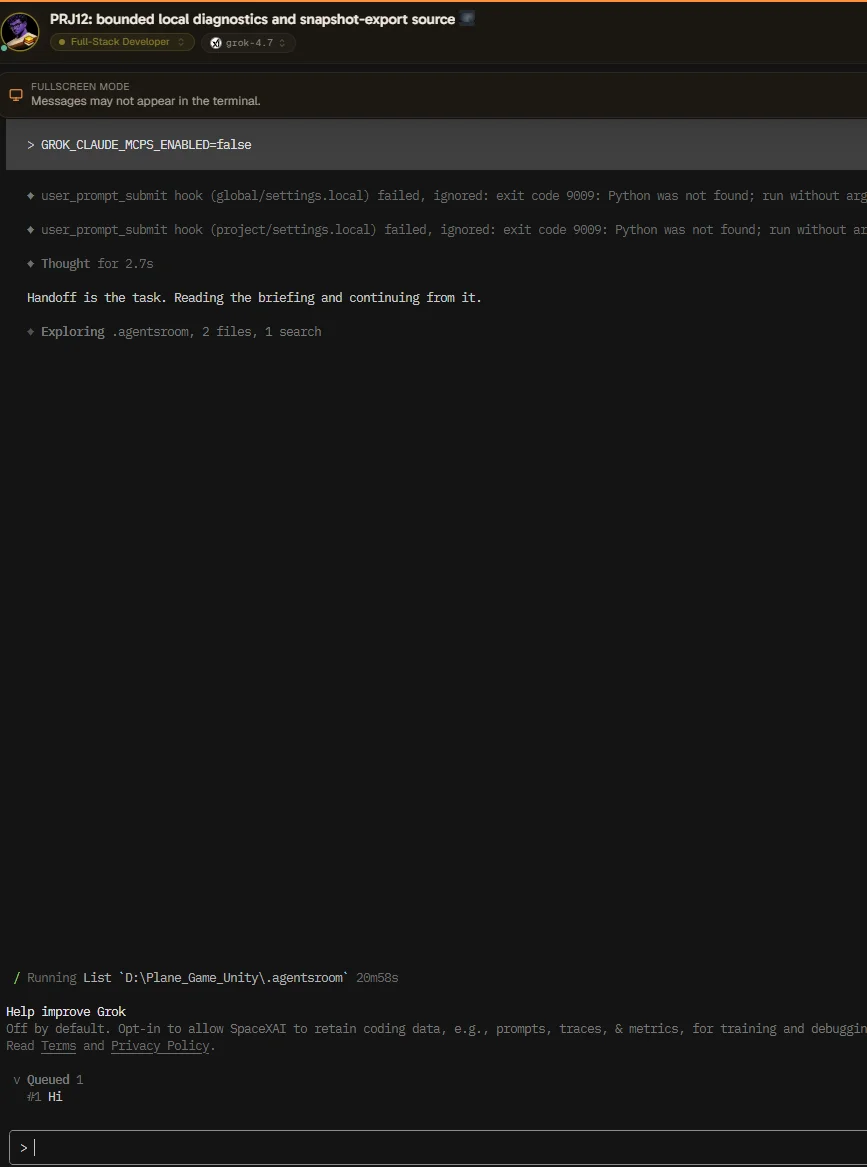
For large servers imported from Claude, you can also add GROK_CLAUDE_MCPS_ENABLED=false in Edit agent > Advanced options > Environment variables, then close and reopen the console. This keeps the AgentsRoom tools and status reporting active.

If the hang persists after this update, please reopen the ticket with as much detail as possible; a screenshot or video helps.

The team2 days ago

Is it working?

The team1 day ago

Sorry we need more details, why did you open the ticket again? Is it not working?

Tarek Rached15 hours ago

PS D:\Unity> & 'C:\Users\user.agentsroom\pty-init\agentsroom-init-11332-142.ps1' error: unexpected argument 'Your task for this session is written in full in this file: C:\Users\user/.agentsroom/agent-prompts/agent-1792617511389-tc5k6o-task.md Read it now, before your first action, and treat its content as the message the user just sent you.' found

Usage: grok [OPTIONS] [PROMPT] [COMMAND]

For more information, try '--help'.

AgentsRoom: 'grok' exited 0s after launch [Application] C:\Users\user.grok\bin\grok.exe (exit code 2) PS D:\Plane_Game_Unity>

Tarek Rached15 hours ago

so the above "GROK_CLAUDE_MCPS_ENABLED=false" worked for one ot two agents then stopped working for the others. all other agents either fail with the above message or remain stuck forever!

Tarek Rached15 hours ago
image.webp
The team14 hours ago

Your latest error happens before Grok loads any tools. Please share the Grok launch line from the agentsroom-init-*.ps1 file shown in the error, and the CLI options and Environment variables fields of one affected agent. Hide passwords, tokens and task text. For an agent that stays stuck, please also share its current Grok version and latest startup errors. We need these to distinguish the two failures.

Up to 3 images, or paste one straight from your clipboard. Big screenshots are shrunk in your browser before they are sent.

Sent automatically with your message

Your browser sent this along so the team can reproduce what you saw. Nothing here was typed by you.

Browser
AgentsRoom-MCP/1.221.1 (win32 x64)